
Resource
AI Detector vs AI Humanizer: How They Differ and Work Together
While AI detectors flag template-like phrasing, AI humanizers rewrite that phrasing into natural prose. Understand when to use each — and how they form a complete detect → fix → verify workflow on Naturalmelo.
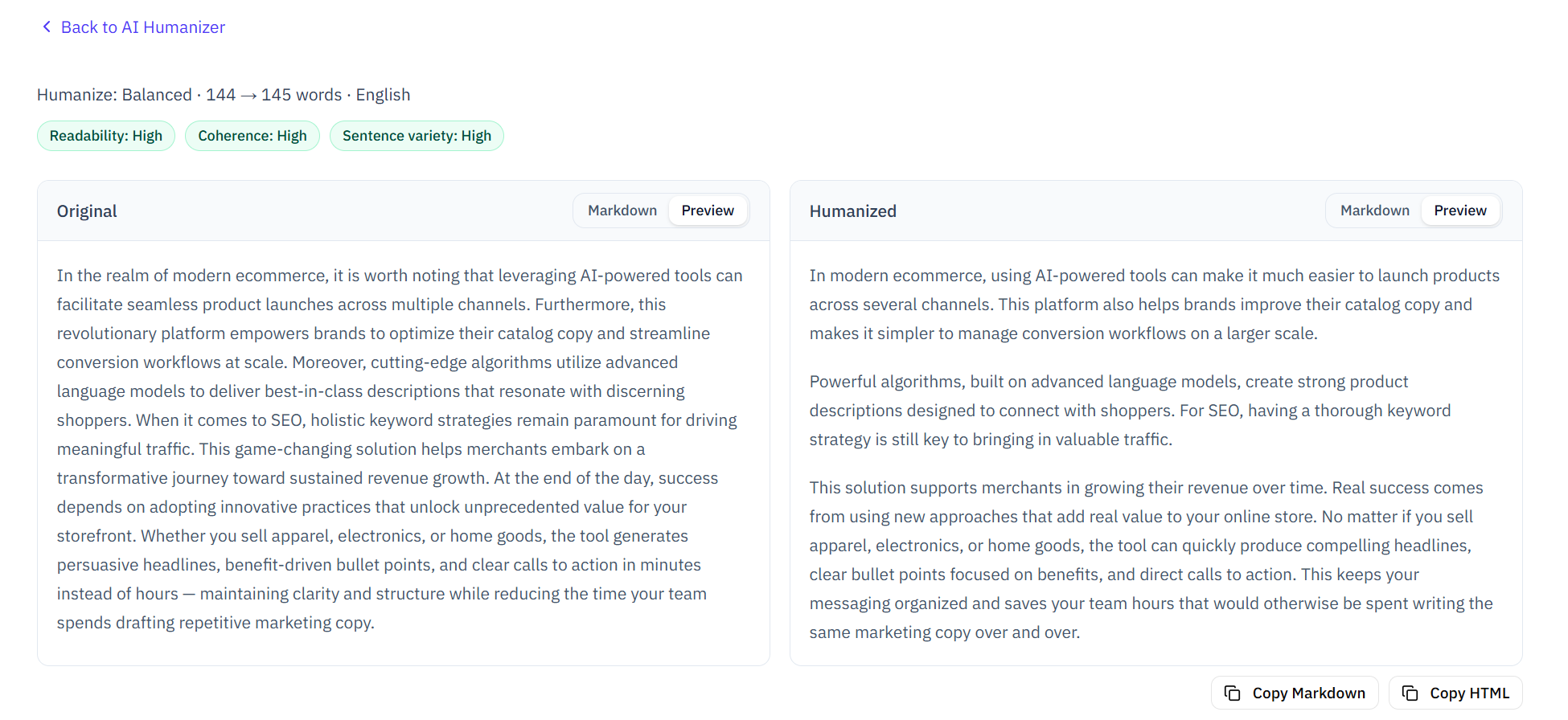
Side-by-side original vs humanized output with readability and quality signals
Core purpose: detection vs transformation
AI detectors and AI humanizers serve opposite but complementary purposes. Understanding the distinction is key to using both effectively in a writing workflow.
While AI detectors scan text for template-like phrasing, hollow transitions, and monotonous rhythm — flagging sentences as AI-like or Mixed — AI humanizers rewrite those same sentences into natural prose while preserving facts, meaning, and structure.
- Detector = identifies what reads like AI (outputs a report with flagged sentences)
- Humanizer = rewrites what reads like AI (outputs natural prose from robotic input)
- Together = detect, fix, and verify in one closed loop
How an AI detector works
Modern AI detectors use a combination of pattern analysis and LLM-powered review to identify telltale signs of AI-generated text — grounded in the same statistical principles (perplexity, burstiness) that Stanford HAI's foundational research identified — the same perplexity, burstiness, and pattern-matching techniques we break down in detail. Naturalmelo runs a hybrid detection engine with 12 proprietary patterns across English and Chinese, checking for industry-thesis openings, stacked connectors, hype words, and monotonous sentence rhythm.
- Sentence-level flags: each hit labeled AI-like, Mixed, or Human-like
- Category tips on each flagged sentence explaining why it was marked
- One-click Humanize per sentence directly in the report
- General and Academic modes for different writing contexts
How an AI humanizer works
Unlike basic paraphrasers that swap synonyms, a clever AI humanizer rewrites at the sentence level — adjusting template phrasing, hollow transitions, and monotonous rhythm while keeping your facts, headings, and structure intact. For manual techniques that complement automated tools, see how to make AI text sound more human. Naturalmelo offers three intensity levels so you control how much the text changes.
While paraphrasers replace words with synonyms — often producing awkward or factually altered output — a clever AI humanizer restructures sentences to sound more natural while preserving meaning, facts, and key terminology.
- Light: quick polish, minimal structural changes
- Balanced: default strength for most AI-assisted drafts (recommended)
- Thorough: strongest de-templating for texts that still sound robotic
- Side-by-side original vs humanized comparison with What Changed breakdown
The detect → fix → verify workflow
The most effective approach combines both tools in a closed loop. Running the detector first shows you exactly which sentences need attention. Humanizing those sentences — either one-by-one in the report or with a full-draft pass — addresses the issues. Running the detector again confirms fewer template signals remain.
- Step 1: Run AI checker → see flagged sentences and AI Writing %
- Step 2: Humanize flagged sentences in the report, or open full-draft Humanizer
- Step 3: Re-check with AI checker → confirm fewer flags
- Step 4: Repeat 1–2 cycles until satisfied
When to use each tool
Use the detector when you need to understand what reads like AI — before submitting an essay, publishing a blog post, or sharing any AI-assisted draft. Use the humanizer when you have identified problematic sentences and want to rewrite them into natural prose without starting from scratch.
- Use detector: pre-submission checks, draft reviews, understanding AI Writing %
- Use humanizer: after seeing flagged sentences, when prose sounds robotic, before final submission
- Use both together: every AI-assisted draft benefits from the full detect → fix → verify loop
Honest limitations of both tools
Neither AI detectors nor AI humanizers can guarantee specific outcomes with third-party systems. An AI detector flags patterns — it does not prove authorship (and false positives affect about 20% of human-written text). An AI humanizer improves readability — it does not guarantee undetectability. Both are tools for writing feedback, not for bypassing institutional policies.
While AI detectors provide pattern-based feedback on template-like writing (not proof of AI authorship), AI humanizers provide readability improvements (not undetectability guarantees). Use both for writing quality — not for gaming detection systems.
- Detector: a low score means fewer template signals, not proof of human authorship
- Humanizer: improved readability, not a guarantee any third-party detector will pass
- Always follow your institution's academic integrity policies
AI Detector vs Humanizer FAQ
Common questions about how AI detectors and humanizers work together.
Should I use an AI detector before or after a humanizer?
Use the detector before the humanizer. It shows which sentences read like AI templates, so you know what to fix. Humanizing first — without knowing which sentences are flagged — can change text that was already fine. After you humanize, run the detector again to verify. The detect → fix → verify loop starts with detection, not after it.
How many detection-humanization cycles do most people need?
Most writers reach a satisfactory result within 1–2 cycles. One check identifies the problem sentences, one humanize pass rewrites them, and one re-check confirms the improvement. Each cycle takes under 2 minutes for a 1,000-word draft.
Does humanizing always lower the AI Writing % score?
Balanced and Thorough humanize passes typically reduce flagged sentence counts by 30–60% in our testing. Light passes produce smaller reductions but preserve more of the original sentence structure. Results vary by text — highly templated drafts may need a second pass.
Can I use the humanizer without the detector?
Yes, but we recommend against it. Without knowing which sentences are flagged, you may humanize text that was already natural — or miss template-heavy passages. The two tools are designed as a pair for a reason: detect first, then fix what needs fixing.
Try the detect → fix → verify workflow
Paste your draft on Naturalmelo and experience the full AI detector + humanizer loop — free, no login.
Run AI writing check