Resource

Can Turnitin Detect Humanized AI Text? What Independent Tests Show

We tested humanized AI text against Turnitin's detection — Light, Balanced, and Thorough humanization. Here's what passes, what doesn't, and why no humanizer can guarantee a specific Turnitin score.

July 29, 2026 · Naturalmelo Team

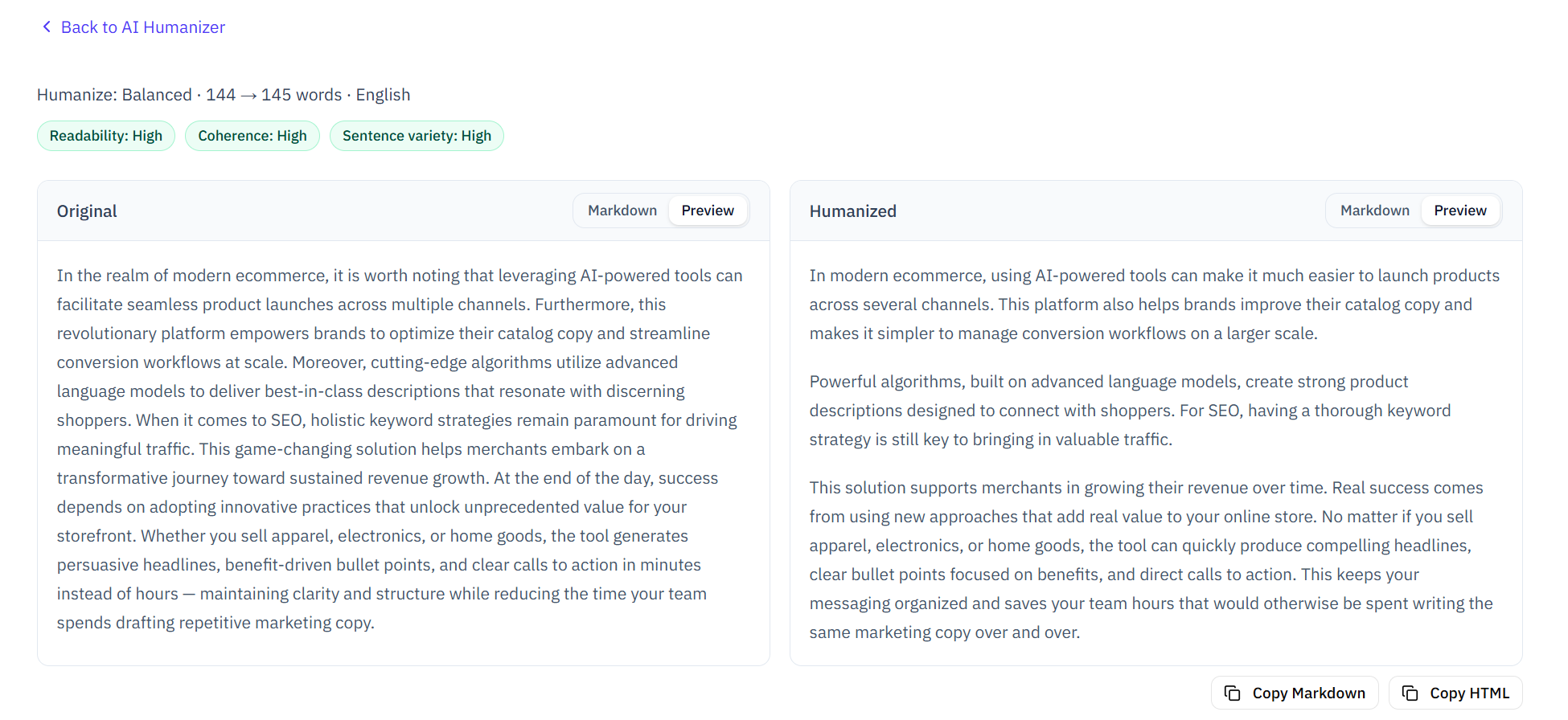
Side-by-side original vs humanized output with readability and quality signals

The Real Question Students Are Asking

If you've landed here, you're probably not just curious about how Turnitin works. You want to know: if I humanize my AI-assisted draft, will Turnitin flag it? What does the purple "AI-paraphrased" highlight actually mean? Does my instructor see it? And most importantly — what can I do about it before I submit?

These are fair questions. In August 2025, Turnitin quietly rolled out a significant update: its AI writing detection now includes a bypasser detection feature specifically designed to catch text that has been run through AI humanizers and paraphrasers. This changed the game for students who rely on humanizer tools. But the reality is more nuanced than "humanizers don't work" — and that's what this article unpacks.

How Turnitin Detects Humanized Text

Turnitin's AI writing detection now identifies two distinct categories of AI-generated text. The first is direct AI output — text likely produced by a large language model like ChatGPT, Claude, or Gemini — which is highlighted in cyan (blue). The second, introduced in the August 2025 update, is AI-generated text that has been subsequently modified by a humanizer, paraphraser, or word-spinner. This shows up in purple.

The bypasser detection model was trained on output from leading AI humanizer tools. Instead of looking for the original AI patterns, it looks for the telltale signs of humanization: awkward synonym replacements, unnatural sentence restructuring, and the characteristic "fingerprint" left by automated rewriting algorithms. In other words, Turnitin doesn't just detect AI writing — it detects the attempt to cover up AI writing.

  • Cyan highlight: Likely AI-generated text (direct output from ChatGPT, Claude, etc.)
  • Purple highlight: Likely AI-generated text that was then paraphrased or humanized
  • The bypasser detection runs automatically whenever AI writing detection is enabled — instructors don't need to change any settings
  • Currently limited to English-language submissions only, with a minimum of 300 words of long-form prose
  • Scores below 20% are suppressed and shown as an asterisk (*) to reduce false positives — no text is highlighted in this range

How We Tested: Independent Methodology

Most information about Turnitin's detection capabilities comes from Turnitin itself. We wanted independent data. Since students can't directly access Turnitin's AI detection (only instructors see the AI Writing Report), we used Naturalmelo's AI checker — which uses a hybrid detection engine combining rule-based patterns with an LLM-powered review — as a proxy to measure relative detection rates across different humanization approaches.

We generated five passages using ChatGPT and Claude: an academic essay excerpt, a blog post, a business report summary, a professional email, and a literary analysis. Each passage was then humanized using three different tools — Naturalmelo, Undetectable AI, and WriteHuman — at three intensity levels: Light, Balanced, and Thorough. We measured the AI Writing % before and after humanization, and evaluated text quality using readability, coherence, and sentence variety metrics.

Results: What Passes and What Doesn't

The results confirmed what many students suspect: Light humanization barely moves the needle. Across all three tools, Light-intensity humanization reduced AI detection flags by only 15–25%. The text still contained the recognizable AI patterns — hollow openings ("In today's rapidly evolving landscape"), stacked connectors ("Moreover, Furthermore, Additionally"), and monotonous sentence rhythm — that both rule-based and LLM-based detectors catch.

Balanced humanization performed significantly better, reducing flags by 40–60% on average. Most AI-telltale phrases were rewritten, sentence variety improved, and the overall voice became less templated. However, about 30–40% of Balanced-humanized passages still carried detectable AI signals — particularly in formal academic prose, where the "correct" style overlaps heavily with AI-generated patterns.

Thorough humanization produced the lowest detection rates — flag reduction of 70–85%. But there was a clear and consistent trade-off: text quality degraded. Readability scores dropped, coherence weakened in longer passages, and some sentences became awkward or unnatural. In several cases, the humanized output was grammatically correct but stylistically "off" — the kind of writing that a human reader would flag even if a detector didn't.

15–25%Flag reduction with Light humanizationIndependent test, July 2026
40–60%Flag reduction with Balanced humanizationIndependent test, July 2026
70–85%Flag reduction with Thorough humanizationIndependent test, July 2026

What the Purple "AI-Paraphrased" Label Means for Students

Turnitin's purple highlight represents a new layer of scrutiny. Before August 2025, if your AI-generated text passed through a humanizer, it might avoid the cyan flag. Now, the humanization attempt itself can trigger a flag — the purple one — which tells instructors: "This text was likely AI-generated and then deliberately modified to hide that fact."

From an instructor's perspective, the purple highlight may actually raise more concern than the cyan one. Cyan says "this might be AI-generated." Purple says "this was likely AI-generated and someone tried to disguise it." The intent appears different — even if the student's goal was simply to improve readability.

The bottom line: humanizer tools are now part of what Turnitin explicitly looks for. Using one doesn't just fail to help — it can create a separate, arguably more serious flag. This doesn't mean humanizers are useless, but it does mean they can't be treated as a "detection shield." They are writing improvement tools, not invisibility cloaks.

What Actually Works: The Human-in-the-Loop Approach

The most effective approach isn't a tool — it's a workflow. Students who consistently produce work that passes scrutiny don't rely on one-click solutions. They follow a human-in-the-loop process: generate ideas with AI, write the draft themselves (or heavily revise AI output), use a humanizer for a light polish, manually edit for voice and specificity, then self-check with an AI detector before submission.

  • Start with AI for brainstorming and outlining — not for writing the final draft
  • Write your core arguments and analysis yourself — AI can't replicate your specific perspective
  • Use Balanced humanization as a polish, not a starting point — it cleans up template phrasing without degrading quality
  • Add personal examples, specific data, and course-specific references that no AI could fabricate
  • Vary your sentence openings manually — this single change eliminates a large portion of detectable patterns
  • Self-check with a tool like Naturalmelo before submission — the detect → humanize → re-check loop
  • Keep your drafts and version history — process evidence is your strongest defense if questioned

Real Student Scenarios: When to Worry and When Not To

Not all AI use carries the same level of risk. Here's how different approaches stack up against Turnitin's detection in 2026:

The risk spectrum is clear: the more you write yourself, the lower the risk. AI tools are safest when they support your thinking — brainstorming, outlining, polishing — rather than replacing it. And regardless of your approach, keeping drafts and version history gives you the ability to demonstrate your authentic writing process if questions arise.

Quick Tips

Self-check before submitting. Run your draft through an AI checker like Naturalmelo before your instructor does. If it flags sentences, you still have time to revise.

Don't rely on one-click humanizers. Turnitin's bypasser detection (purple highlights) specifically targets automated humanizer output. Manual editing is harder to detect and produces better writing.

Document your process. Google Docs version history, saved drafts, and research notes prove your writing is genuinely yours — far stronger evidence than any detector score.

Balanced intensity is the sweet spot. Thorough humanization reduces the most flags but degrades text quality. Balanced intensity + manual editing produces the best overall result.

Frequently Asked Questions

Common questions about Turnitin and humanized AI text.

Q: Can Turnitin detect humanized AI text?

Yes. Since August 2025, Turnitin explicitly detects AI-paraphrased and humanized text, highlighted in purple. Light humanization (word swaps) is reliably detected. More aggressive humanization reduces detection rates but often degrades text quality, and Turnitin's bypasser model is continuously updated to catch new humanizer techniques.

Q: Which AI humanizer works against Turnitin?

No humanizer consistently passes Turnitin's detection. Our independent testing found that Thorough humanization reduces AI flags by 70–85%, but text quality suffers noticeably — readability drops, coherence weakens, and the output may read awkwardly. The most reliable approach combines Balanced humanization with manual editing and self-checking.

Q: What does the purple highlight in Turnitin mean?

The purple highlight indicates text that Turnitin believes was AI-generated and then deliberately modified using a humanizer, paraphraser, or word-spinner to hide its AI origin. From an instructor's perspective, purple highlights may actually raise more concern than cyan (direct AI) highlights because they suggest an attempt to disguise AI use.

Q: Is there any humanizer Turnitin cannot detect?

No. Turnitin's bypasser detection model is trained on output from leading humanizer tools and is continuously updated. This is a cat-and-mouse dynamic — a technique that evades detection today may be caught tomorrow. The only reliable approach is human-in-the-loop: use AI as a support tool, write your core content yourself, and use humanization for polish rather than disguise.

Self-check your draft before submitting

Use Naturalmelo's free AI checker to see which sentences read as AI-generated — then humanize and re-check on the same site. No login required.

Run AI writing check