
Recursos
Prompts para humanizar IA: 12 plantillas para que el texto suene humano
El prompt correcto puede transformar salida robótica de IA en prosa natural antes de tocar un humanizador. Aquí van 12 plantillas de prompts probadas — con ejemplos antes/después — que le dicen a la IA que escriba como una persona, no como una plantilla.
Publicado 29 de julio de 2026 · Equipo Naturalmelo
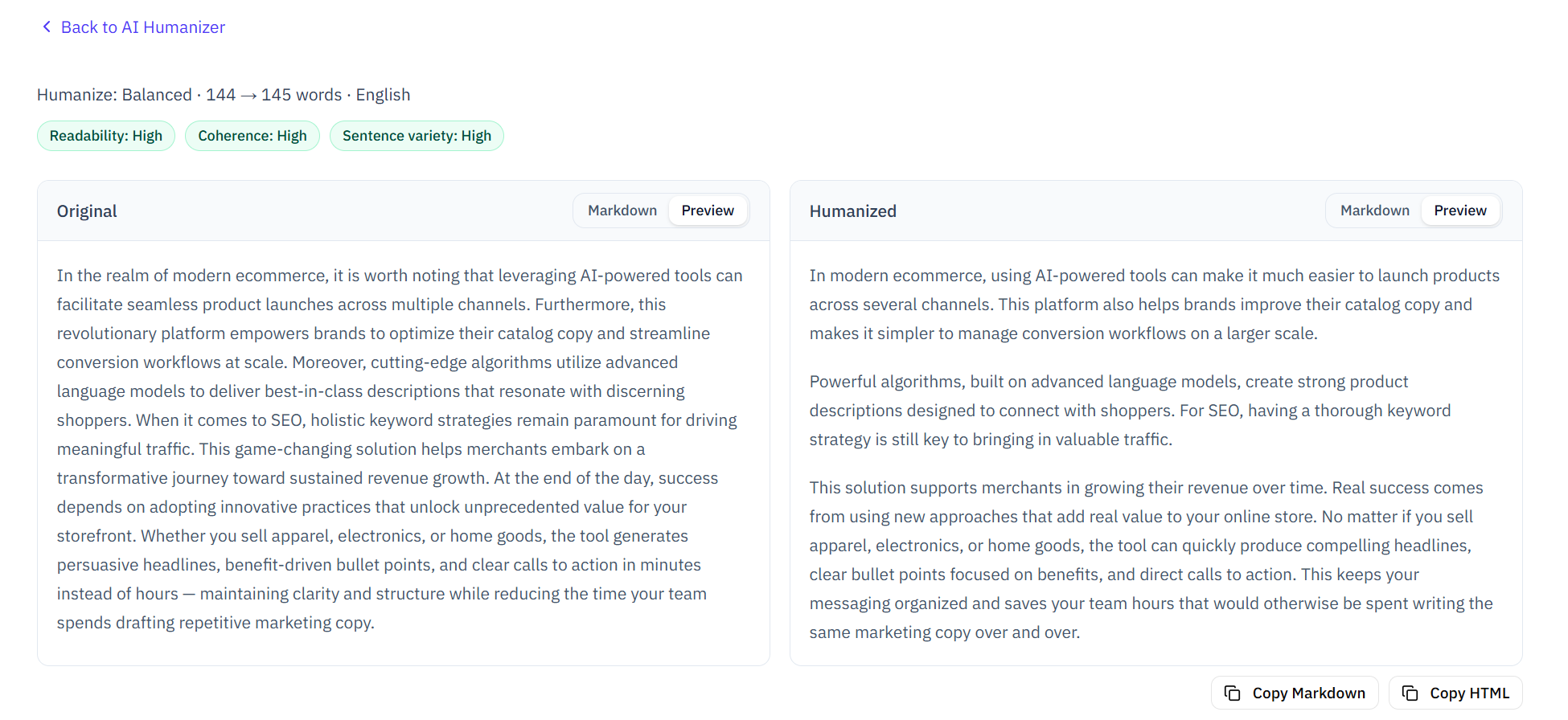
Comparación lado a lado del original y el texto humanizado, con señales de legibilidad y calidad
Por qué importan los prompts: la humanización empieza antes de generar
La mayoría piensa la humanización como algo que haces después de que la IA escribe — pegas la salida en un humanizador, haces clic y esperas lo mejor. Pero la humanización más efectiva ocurre río arriba, a nivel de prompt, antes de que la IA genere una sola palabra.
La razón: cuando le das a la IA un prompt genérico como “Write a blog post about X”, cae en sus patrones más predecibles — el promedio estadístico de sus datos de entrenamiento. Ese promedio es exactamente lo que buscan los detectores de IA: longitudes de oración equilibradas, transiciones estándar, vocabulario común y el tono vacío y cauteloso del contenido de plantilla. Un prompt bien elaborado cambia lo que produce la IA en origen, reduciendo patrones detectables antes de que cualquier humanizador toque el texto.
Piénsalo así: un humanizador es como un filtro sobre una foto — puede ajustar lo que ya está, pero no cambia la composición. Un buen prompt es como encuadrar bien la toma desde el principio. Los mejores resultados vienen de hacer ambas cosas.
Voz y tono: 4 plantillas para una expresión natural
La señal de IA más obvia es la voz — o la falta de ella. El texto generado por IA cae por defecto en un tono neutro, equilibrado y “profesional” en el que ninguna persona escribe de forma natural. Estas cuatro plantillas empujan a la IA hacia voces específicas y reconocibles.
- Plantilla 1 — “Explícaselo a un amigo”: Reemplaza “Write a blog post about [topic]” por “Explain [topic] like you're talking to a friend over coffee. Use contractions. Be casual but clear. If something is complicated, say so.” Antes: “Artificial intelligence detection employs sophisticated algorithms to analyze textual patterns.” Después: “AI detectors work by looking for patterns in how you write — stuff like whether your sentences all sound the same length or if you use certain words way more than a typical person would.”
- Plantilla 2 — “Escribe como [autor específico]”: Nombra a un escritor cuya voz quieras canalizar. “Write this in the style of [author name]. Same sentence rhythm, same vocabulary level, same willingness to have opinions.” Funciona mejor con escritores distintivos — no elijas a alguien que escribe de forma genérica.
- Plantilla 3 — “Usa primera persona y experiencia personal”: Añade “Write this in first person. Include a brief personal anecdote or observation. It doesn't need to be real — but it needs to sound like something a specific person actually experienced.” Esto fuerza a la IA a una perspectiva que los detectores asocian con escritura humana.
- Plantilla 4 — “Imita esta muestra de escritura”: Pega 2–3 párrafos de tu propia escritura y di: “Match this writing style. Same sentence rhythm, same vocabulary level, same use (or avoidance) of contractions, same paragraph length.” Cuanto más distintiva sea tu muestra, mejor el ajuste. Es la técnica más efectiva para que la salida de IA suene específicamente a TI.
Estructura y ritmo: 3 plantillas para un flujo más humano
Los detectores de IA miran mucho los patrones de estructura de oraciones — en concreto, cuánto varía la longitud dentro de un pasaje y si las transiciones siguen plantillas predecibles. La escritura humana tiene ráfagas de oraciones cortas seguidas de otras más largas y complejas. La de IA tiende a oraciones uniformes de longitud media unidas por transiciones estándar.
- Plantilla 5 — “Varía la longitud de forma agresiva”: Añade “Mix very short sentences (3–5 words) with medium and occasionally long ones. After any paragraph with three similar-length sentences, break the pattern. Read your output aloud — if it sounds like a metronome, rewrite it.” Antes: un párrafo de cuatro oraciones de la misma longitud. Después: “The study confirmed it: uniform sentence length is a dead giveaway. Three same-length sentences in a row? That's an AI pattern. Human writers don't do that. They mix it up — short. Then longer, with a natural rhythm that varies from paragraph to paragraph.”
- Plantilla 6 — “Sin aperturas predecibles”: Añade “Never start a sentence with 'In today's world,' 'It is worth noting that,' 'Moreover,' 'Furthermore,' 'Additionally,' 'In conclusion,' or 'It is important to understand.' Start each paragraph differently from the last. If you catch yourself using a transition word, delete it and see if the sentence still works — it usually does.”
- Plantilla 7 — “Párrafos cortos, cortes naturales”: Añade “Paragraphs should be 1–3 sentences. No more. If a paragraph runs longer, find the natural break. Some paragraphs can be a single sentence. That's fine — humans write that way. AI doesn't.” Esta plantilla produce el ritmo visual de la escritura humana, y eso importa porque algunos detectores analizan patrones a nivel de párrafo.
Reducir marcas: 3 plantillas que bajan las señales de IA
Estas plantillas apuntan a los patrones específicos de vocabulario y formato que marcan los detectores de IA. Se basan en el mismo léxico de patrones que usan los motores de detección, invertido como instrucciones de escritura.
- Plantilla 8 — “Lista de vocabulario prohibido”: Añade “Never use these words: delve, tapestry, testament, underscore, moreover, realm, leverage, vibrant, crucial, pivotal, intricate, fostering, showcasing, seamless, robust, synergy, game-changer, revolutionary, unlock, empower, harness. If you're tempted to use one, say the same thing in plain words.” Esto elimina directamente el vocabulario de IA más marcado.
- Plantilla 9 — “Sin rayas em, sin transiciones huecas”: Añade “Do not use em dashes (—). Replace them with commas, periods, or rewrite the sentence. Delete filler phrases like 'It's worth noting that,' 'What really matters is,' 'At its core,' and 'The truth is.' These add zero meaning and are strong AI indicators.” Las rayas em se marcan de forma consistente como la señal de formato número uno en varias herramientas de detección.
- Plantilla 10 — “Escribe con imprevisibilidad media”: Añade “Be specific but not random. Use words that fit the context without being the most obvious choice every time. If you use a predictable phrase, follow it with something unexpected. Don't try to sound smart — try to sound clear.” Esto apunta a la detección basada en perplexity: demasiado predecible = IA, demasiado aleatorio = sinsentido, medio = humano.
Por dominio: 2 plantillas para distintos contextos de escritura
Distintos tipos de escritura activan distintos patrones de detección. La escritura académica que suena demasiado “correcta” se lee como generada por IA porque la prosa académica formal se solapa mucho con los datos de entrenamiento de los LLM. El copy de marketing que usa lenguaje de hype activa reglas de coincidencia de patrones.
- Plantilla 11 — “Ensayo académico”: Añade “Write like a thoughtful undergraduate, not a PhD dissertation. Use discipline-appropriate terminology but avoid jargon where plain language works. Make an argument, not a survey. Cite specific ideas — if you don't know a real source, don't invent one; flag where a citation would go with [CITATION NEEDED]. Acknowledge limitations and counterarguments honestly.” Esto empuja la escritura académica hacia la zona “formalidad media con personalidad” que se lee como trabajo auténtico de estudiante, no como prosa de encuesta generada por IA.
- Plantilla 12 — “Copy de marketing”: Añade “Sell without sounding like a template. No 'revolutionary,' no 'game-changing,' no 'unlock your potential.' Describe what the product actually does and who it's actually for. Use specific numbers and concrete scenarios. Write like you're recommending something to a colleague, not like you're reading from a script.” Esto evita los patrones de hype de marketing (P05, P07) que los detectores basados en reglas apuntan de forma específica.
La cadena de 3 prompts: Esquema → Expandir → Pulir
El enfoque más efectivo no es un solo prompt — es una secuencia de tres, cada uno abordando una capa distinta de la escritura. Esta técnica, usada por escritores profesionales que trabajan con IA, produce salidas mucho más difíciles de marcar para los detectores que la generación con un solo prompt.
- Prompt 1 — Esquema con voz: “Create an outline for an article about [topic]. Write the outline in your natural speaking voice — not formal, not bullet-pointy. Include a specific example or personal observation for each main point.” Esto establece la estructura sin fijar prosa de plantilla.
- Prompt 2 — Expandir con personalidad: “Now expand each point from the outline into full paragraphs. Write in first person. For each section, include either a specific example, a personal opinion, or a concrete detail that only someone familiar with this topic would know. Vary paragraph length.” Esta capa añade la especificidad e irregularidad que los detectores asocian con escritura humana.
- Prompt 3 — Pulir: “Read through what you wrote. Fix any sentence that sounds robotic, templated, or like it could appear in any other article on this topic. If you used any of the banned words from Template 8, replace them. Then do one more pass: highlight any sentence that STILL feels machine-made and fix it.” Este pase final limpia patrones residuales de IA que sobrevivieron a los dos primeros prompts.
Combinar prompts con herramientas humanizadoras
Los prompts y las herramientas humanizadoras funcionan mejor juntos, en distintas etapas del proceso. Los prompts reducen el problema río arriba — evitan que aparezcan patrones de IA desde el principio. Las herramientas humanizadoras limpian río abajo — atrapan los patrones que los prompts no cubrieron.
El flujo combinado se ve así: usa la cadena de 3 prompts para generar un borrador con voz natural y estructura variada. Luego pásalo por un humanizador de intensidad Equilibrada (como el de Naturalmelo) para atrapar frases de plantilla restantes, transiciones huecas o ritmo monótono. Por último, auto-revisa con un detector de IA para ver qué patrones quedan y edita a mano esas oraciones.
Este ciclo prompt → humanizar → analizar → editar produce de forma consistente escritura con menos patrones de IA detectables que cualquiera de los enfoques solos. Los prompts hacen el trabajo pesado — dan a la IA una voz humana desde el inicio. El humanizador hace el ajuste fino — suaviza las aristas. Y la auto-revisión confirma el resultado.
Chuleta de prompts: las 12 plantillas de un vistazo
Aquí va cada plantilla en forma condensada — copia, pega y adapta a tu caso:
- #1 Explícaselo a un amigo: "Explain [topic] like you're talking to a friend over coffee."
- #2 Voz de autor: "Write this in the style of [author]. Same rhythm, same vocabulary."
- #3 Primera persona: "Write in first person. Include a personal anecdote or observation."
- #4 Imitar muestra: "Match this writing style: [paste 2–3 paragraphs of your writing]"
- #5 Variar longitud: "Mix very short sentences with medium and long. Break predictable patterns."
- #6 Sin aperturas estándar: "Never start with 'In today's world,' 'Moreover,' 'Furthermore.'"
- #7 Párrafos cortos: "Paragraphs 1–3 sentences. Single-sentence paragraphs are fine."
- #8 Palabras prohibidas: "Never use: delve, tapestry, moreover, leverage, robust, synergy, etc."
- #9 Sin rayas em: "No em dashes. Delete filler like 'It's worth noting that.'"
- #10 Perplexity media: "Be specific but not random. Don't choose the most obvious word every time."
- #11 Académico: "Write like a thoughtful undergrad. No fake citations. Acknowledge limitations."
- #12 Marketing: "Describe what it actually does. No 'revolutionary' or 'game-changing.'"
Consejos rápidos
Combina prompts con herramientas. Usa prompts para reducir patrones de IA en origen y luego pasa por un humanizador para el pulido final — los dos enfoques se complementan.
Usa la cadena de 3 prompts. Esquema → Expandir → Pulir. Cada prompt aborda una capa distinta de la escritura y produce salida más natural que cualquier prompt solo.
Imita tu propia voz. La plantilla 4 (pegar una muestra de tu escritura) produce de forma consistente la salida más humana porque imita TUS patrones específicos, no patrones humanos genéricos.
Auto-revisa después de usar prompts. Incluso la salida de IA bien promptada puede llevar patrones detectables. Pasa tu borrador final por un detector de IA antes de publicar o entregar.
Preguntas frecuentes
Dudas comunes sobre usar prompts para humanizar texto de IA.
¿Cuál es el mejor prompt único para humanizar texto de IA?
No hay un solo mejor prompt — el enfoque más efectivo depende de lo que estés escribiendo. Para escritura cotidiana, la plantilla 1 (“explícaselo a un amigo”) produce los resultados más naturales. Cuando importa la autenticidad, la plantilla 4 (imitar tu propia muestra) es la más fuerte. Los mejores resultados generales vienen de la cadena de 3 prompts: Esquema → Expandir → Pulir, que aborda estructura, sustancia y patrones de superficie en secuencia.
¿Puede un solo prompt generar y humanizar al mismo tiempo?
Sí — y de hecho es más efectivo que generar primero y humanizar después. Incluye las reglas de humanización en tu prompt inicial de generación: especifica voz, vocabulario prohibido, requisitos de variedad de oraciones y reglas de formato antes de que la IA escriba. Luego usa un humanizador para el pulido final de la salida.
¿Estos prompts funcionan distinto en ChatGPT, Claude y Gemini?
Sí. ChatGPT tiende a prosa estructurada y equilibrada — las plantillas 5 (variar longitud) y 7 (párrafos cortos) son especialmente importantes. Claude es más variado de forma natural pero puede ser demasiado cauto — la plantilla 10 (tomar postura, tener opiniones) ayuda. Gemini es más conversacional — las plantillas 8 (vocabulario prohibido) y 9 (sin transiciones huecas) son las más críticas.
¿Estos prompts harán mi texto indetectable para los detectores de IA?
Ningún prompt puede garantizar que tu texto pase la detección de IA — los detectores usan múltiples señales que ninguna técnica de prompt sola cubre del todo. Estas plantillas reducen de forma medible los patrones detectables, pero deben formar parte de un flujo más amplio: ingeniería de prompts → pulido con humanizador → edición manual → auto-revisión. La meta es escritura mejor y más natural — no la invisibilidad.
Humaniza tu borrador con Naturalmelo
Usa el humanizador de IA gratuito de Naturalmelo para pulir la salida generada con prompts — intensidad Leve, Equilibrada o Profunda, con comparación lado a lado e insignias de calidad.
Probar humanizador de IA